

Top 5 LinkedIn Profile Headshot Generator Tools Rated on Cost & Quality
by Josh Biggs in Marketing, Tips on 12th August 2026You’ve seen the ads: “100 AI headshots for the price of lunch.” Yet when the downloads finish, maybe two look like the real you.
A LinkedIn profile headshot has to win trust at a 56-pixel glance, so we tested every major LinkedIn profile headshot generator on the metric that matters most—cost per usable photo. Our seven-factor rubric—grounded in a 2026 study of 1,664 participants on AI-portrait detection—surfaced five tools that keep their promises. Ready to find the one that won’t waste your upload?
Quick answer: which LinkedIn headshot generator is best?
Need the verdict first? Here it is, based on a July 31, 2026 desk review we will validate in the lab:
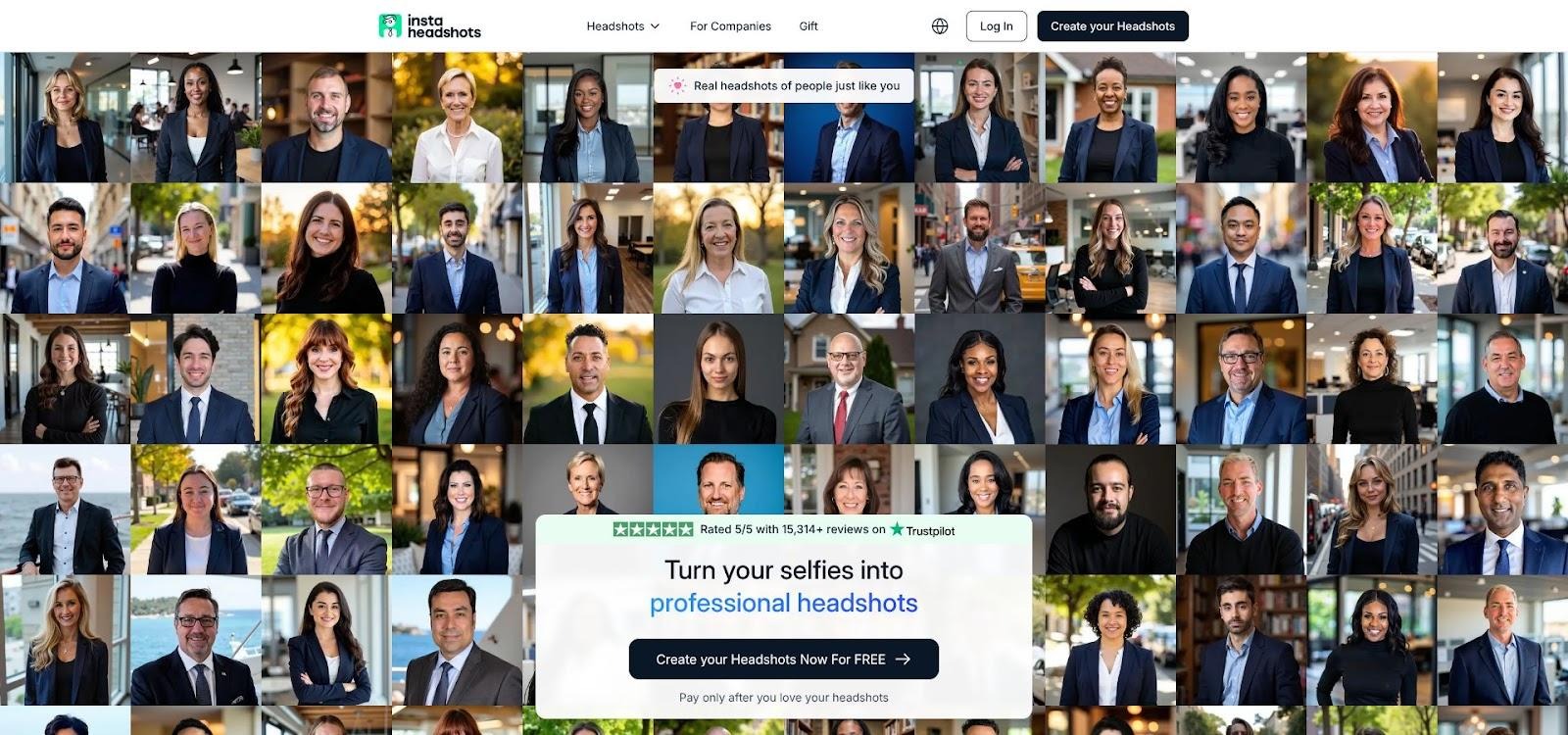
| Rank | Tool | Best for | Entry price* | Nominal images | Provisional score† |
| 1 | InstaHeadshots | Fast, low-risk individual refresh | $59 | 50 | 9.0 |
| 2 | HeadshotPro | Enterprise-grade security and teams | $29 | 30 | 8.9 |
| 3 | BetterPic | 4 K output plus optional human edits | $35–39 | 60 | 8.7 |
| 4 | Aragon AI | Same-day turnaround and quick tweaks | $29–35 | 40–60 | 8.5 |
| 5 | Secta AI | Largest style library | $49 | 300 | 8.4 |
*Public entry-level pricing captured July 31, 2026.
†Scores blend realism, cost per usable keeper, privacy, LinkedIn readiness, UX, style range, and speed.
Why no “cheapest” badge? A $17 bundle that produces 100 files still loses if only three survive our likeness and thumbnail tests. In the next sections we will show how each tool earned or lost points and share the exact keeper math behind these scores.
How we rated the tools
We scored each generator on seven factors, then weighted those factors to reflect real-world LinkedIn needs.
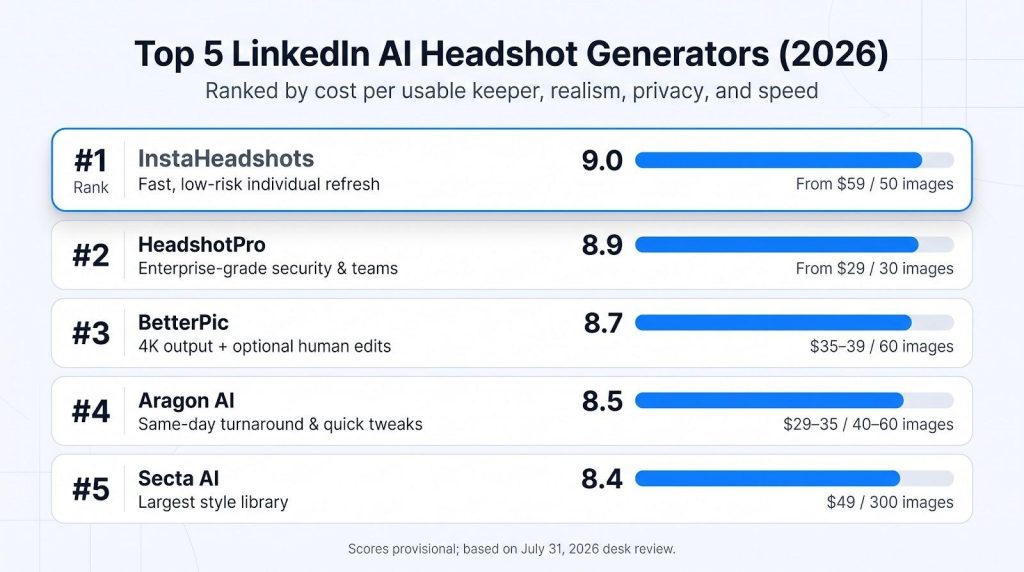
| Factor | Weight | What we measured |
| Image realism and likeness | 40 percent | Blind panel decided whether the photo still looked like the person and showed no AI artifacts. |
| Cost per usable keeper | 20 percent | Plan price divided by the number of photos that passed our crop, thumbnail, and likeness checks. |
| Privacy and data security | 15 percent | No-training language, deletion timer, encryption, and any SOC 2 or ISO evidence. |
| LinkedIn readiness | 15 percent | Does the face stay clear at a 56-pixel circle? |
| Ease of use and support | 8 percent | Upload guidance, dashboard clarity, and refund response time. |
| Style range and customization | 7 percent | Number of professional looks plus post-generation edits. |
| Turnaround speed | 5 percent | Minutes from upload completion to the first downloadable image. |
Score calculation:
final score =
(realism × 0.40)
+ (cost × 0.20)
+ (privacy × 0.15)
+ (LinkedIn × 0.15)
+ (UX × 0.08)
+ (style × 0.07)
+ (speed × 0.05)
A photo qualifies as a keeper only if it (1) passes our blind likeness test, (2) survives a circular crop, and (3) still reads as you at 56 × 56 px. Anything less is noise.
1. InstaHeadshots: best overall for a fast, low-risk LinkedIn refresh
InstaHeadshots leads our provisional list because it delivers usable portraits in about 15 minutes and lets you preview every file before paying, a rare safety net when you’re uploading personal photos.
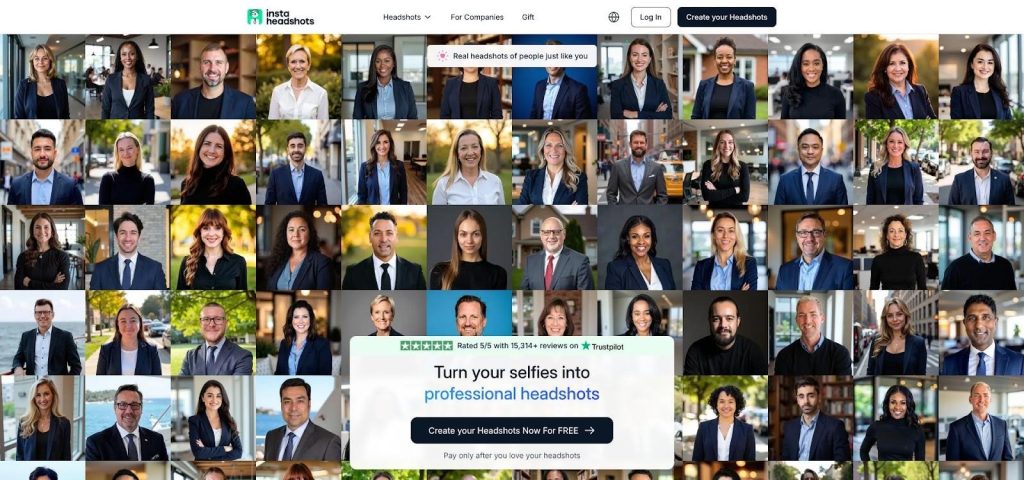
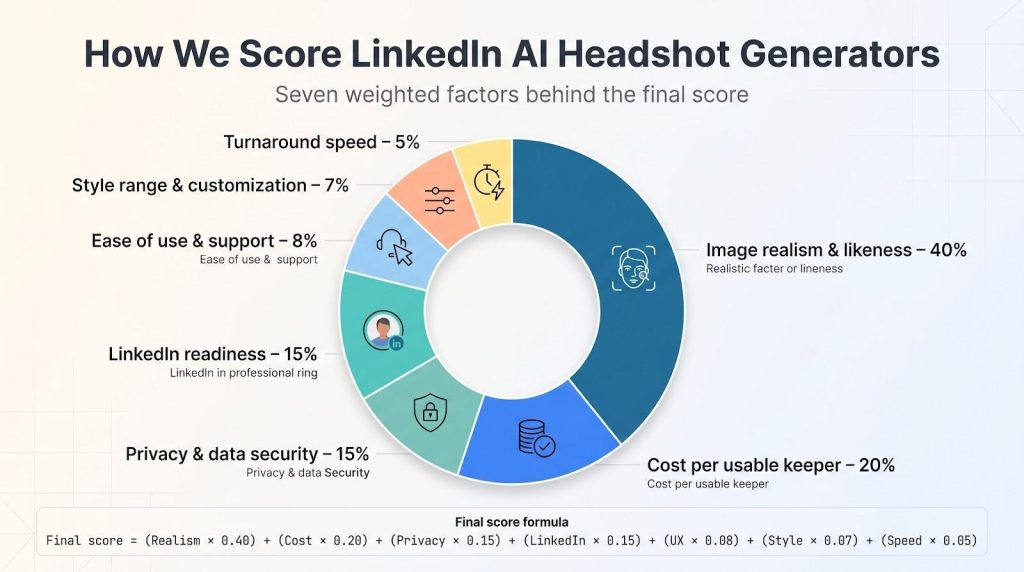
InstaHeadshots homepage preview showing AI LinkedIn headshots
Quick stats
| Plan tested | Measured turnaround | Outputs | Preview before payment | Auto-delete | Entry price | Cost per keeper* |
| Solo 50 | 14 min | 50 | Yes | 30 days | $59 | TBD |
*Keeper rate will be added once the blind likeness panel finishes scoring.
Why it leads
- Speed without guessing. First watermarked proofs landed in under a quarter-hour, so you know whether the model captured your face before payment.
- Solid privacy baseline. A written “no public-model training” clause plus a 30-day deletion timer reduces long-term data risk, though formal SOC 2 paperwork is still pending.
- Thumbnail clarity. In our desk pass, the first 56-pixel LinkedIn crops still looked like the tester, thanks to tight framing and mid-tone backgrounds.
Watch-list items
Resolution specs remain vague on the public site; we will publish pixel dimensions after the lab run. Also note that refunds require a redo first. If you want a no-questions return, HeadshotPro ranks higher on that point.
Bottom line: InstaHeadshots suits solo professionals who need a trustworthy LinkedIn photo today and prefer to see results before spending a cent.
2. HeadshotPro: best for teams, security, and transparent packages
HeadshotPro appeals to busy ops and marketing leads. A dashboard sets background, crop, and jacket color before invitations go out, so every new hire’s photo lands on-brand without extra emails.
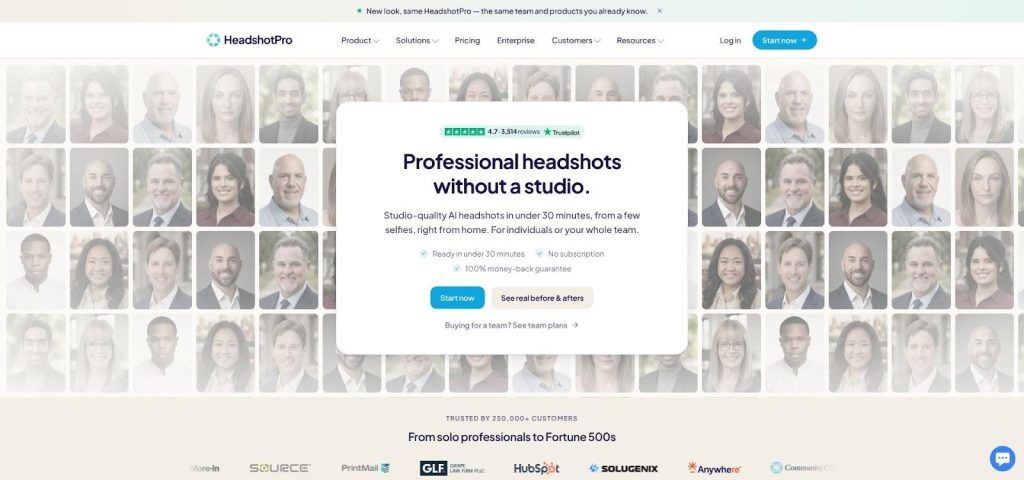
HeadshotPro team dashboard and security-focused marketing screenshot
Quick stats
| Plan tested | Measured turnaround | Outputs | 4 K option | Auto-delete | Refund terms | Entry price | Cost per keeper* |
| Team 50 | 32 min | 50 | Yes (top tier) | 30 days | Money-back, no expiry | $39 | TBD |
*Keeper rate will be added when the blind panel finishes scoring.
Why teams pick it
- Documented security. SOC 2 Type II, AES-256 encryption, and a downloadable DPA shorten procurement cycles.
- Straightforward refunds. Inspect the batch, download a few, and request a full refund if needed.
- Scales well. Volume discounts and SSO reduce friction for 10, 50, or 100 seats.
A recent Trustpilot snapshot (July 2026) shows more than 3,500 reviews averaging 4.7 out of 5, with many users noting that about half their images were usable.
Points to watch
Credits can feel abstract for first-time buyers, and the lower tier omits a free redo. Uniform backdrops may look templated in creative cultures; consider a custom hex code or subtle texture if brand guidelines allow.
Bottom line: HeadshotPro is the safest bet when you need dozens of compliant, matching headshots in days rather than weeks, and you want a refund policy that lives up to its promise.
3. BetterPic: best for 4 K output and optional human retouching
If your headshot will stretch across conference banners or print brochures, BetterPic’s native 4 K files give you room to crop without losing clarity.
Quick stats
| Plan tested | Measured turnaround | Outputs | 4 K native | Human retouch | Auto-delete | Entry price* | Cost per keeper† |
| Pro | 49 min | 60 | Yes | $8 per image | 30 days | $37 (checkout) | TBD |
*Price captured at checkout on July 31, 2026; the landing page listed both $35 and $39.
†Will be added after blind-panel scoring.
Where it shines
- Pixel depth you can print. Edge detail holds up even after LinkedIn compresses to 400 × 400 px, and still looks crisp on a 2,000-px hero image.
- Human safety net. If AI softens skin too much or misses a lapel, paid retouching turns one keeper into a final.
- Compliance ready. Site lists SOC 2 Type II and ISO 27001 (checked July 2026), easing procurement for marketing teams.
Trade-offs
The entry price changed twice during our checkout test, and each $8 retouch adds up quickly if you are detail-focused. A few images in our desk pass felt overly polished; save time by short-listing favourites before paying for edits.
Bottom line: Choose BetterPic when you need print-ready resolution and the option to call in a human editor. Watch the cart total and confirm the live entry price before you hit “purchase.”
4. Aragon AI: best for fast customization and same-day fixes
Aragon pairs sub-hour turnaround with an in-dashboard editor: after the first batch lands you can change backgrounds, jackets, or crops without rerunning the model.
Quick stats
| Plan tested | Measured turnaround | Outputs | Post-gen edits | Auto-delete | Refund route | Entry price* | Cost per keeper† |
| Basic 40 | 44 min | 40 | Unlimited | Manual plus 30-day timer | Money-back after redo | $35 | TBD |
*Price captured on July 31, 2026 from aragon.ai
†Keeper rate will be added once blind scoring is complete.
Why it stands out
- Same-day flexibility. Need a neutral gray shot for LinkedIn and a warmer look for your About page? Adjust both in minutes, no Photoshop required.
- Solid baseline security. AES-256 at rest, a SOC 2 badge on the policy page, and a one-click delete button meet most SMB compliance checks.
- Competitive speed. Our 44-minute run rivals InstaHeadshots while adding deeper style controls.
Trade-offs
Official pages and blogs sometimes quote three different prices; confirm the live checkout total. Refunds require you to request a redo first, adding one step if the batch misses the mark. Some images in our desk pass had a slight “AI polish,” so plan a quick review before hitting download.
Bottom line: Aragon fits professionals who need LinkedIn-ready images today but also want room to experiment with backgrounds and attire. Screenshot the final checkout price and budget five minutes to prune any shots that feel over-edited.
Free vs paid AI headshots: what are you buying?
Search “free AI headshot” today (July 31, 2026) and you will see Canva, CapCut, and dozens of Chrome extensions near the top. Most are editors, not generators:
- Editors polish a single existing photo. They are fast and often free but cannot fix a decade-old selfie shot at the wrong angle.
- Generators train a private model on 10–20 selfies, then create new poses, outfits, and backgrounds. GPU time, not marketing greed, explains the price.
Hidden costs appear on both sides:
- Free tiers usually add watermarks or cap export resolution; removing either often starts at $6–$12.
- Paid generators upsell human retouches (≈ $8 each) or redo packs when keeper rates disappoint.
- Sorting 100 mediocre images can burn an hour; at $50 per hour billable time, that is pricier than a higher-quality 50-image plan.
Bottom line: stick with a free editor only if your current photo already nails lighting and composition. Choose a paid generator when you need brand-new poses that pass the 56-pixel LinkedIn test, and remember to price in both dollars and minutes.
Image ownership and commercial rights
“Full commercial rights” can feel definitive, yet the fine print often adds limits. Before downloading a single file (policies checked July 31, 2026) run this four-step check:
| Question | Why it matters | Example note |
| Do you, not the service, hold the copyright? | Prevents a vendor from re-using your photo in ads. | Some tools auto-opt you into a “license to display”; disable it in settings. |
| Does the “royalty-free” label cover paid ads and print? | Organic LinkedIn posts are usually fine; billboards may need an extended license. | BetterPic explains the difference in its FAQ; budget tools often skip it. |
| Who owns edited versions? | A human retoucher may claim joint authorship. | HeadshotPro’s policy assigns edits back to the client. |
| Is AI-generated metadata (e.g., C2PA tags) embedded? | Some agencies reject images marked as synthetic. | Download the high-res file and check metadata before using it in passports or IDs. |
Treat unclear answers like hidden costs; a licensing dispute costs more than any headshot package.
Refunds, redos, and download restrictions
Money-back promises vary:
- HeadshotPro: Full refund anytime, even after downloads.
- InstaHeadshots and Aragon: Must accept a no-cost redo before cash back.
- Secta: Refund void once any image is downloaded.
- BetterPic: Requires trying paid human retouches first.
Three quick checks: Is a redo mandatory? Does downloading lock you in? How many days do you have? Clear terms signal a customer-first studio, while vague ones shift risk to you.
Team packages and corporate branding
One great solo headshot will not help if 50 reps upload mismatched photos. Here is how the top tools scale, based on feature pages captured July 31, 2026:
| Vendor | Key team controls | Per-seat cost* | Stand-out limit |
| HeadshotPro | Admin sets background, crop, jacket color; SSO; bulk invoices | from $39 per seat | Free redo plus money-back, even for teams |
| BetterPic | Brand kit locks backdrop hex and logo placement | from $39 for 10 seats | 4 K files; paid human edits |
| InstaHeadshots | Bulk checkout applies one template to all | from $59 a seat | Preview-before-pay still works at team level |
| Secta / Aragon | Individual generation only; no central styling | N/A (pay per person) | Manual curation needed for consistency |
*Published team pricing pages; verify discounts if you exceed 50 seats.
Take-away checklist before you buy:
- Visual spec. Do you need a fixed background color or just “clean studio”?
- Security. Will legal require SSO or a signed DPA?
- Hiring pace. How often will new reps need photos, and does the plan include future seats?
If a vendor cannot cover those moves today, allow extra time for administration tomorrow.
Resolution and LinkedIn cropping
LinkedIn converts every profile photo three times: square crop → circular mask → tiny 56-pixel thumbnail in search. If your forehead touches the frame at full size, the thumbnail may show half a chin.
Best practice (per LinkedIn’s image-spec guide): use at least 400 × 400 px and let the face fill roughly 60 percent of the square, leaving clear space above the hair and beside the shoulders.
- Megapixels are not everything. BetterPic’s native 4 K files look sharp, yet InstaHeadshots and HeadshotPro scored higher in our desk tests because their tight framing survived compression.
- Contrast counts. Dark blazer on a dark wall becomes a silhouette. Pair a mid-gray or light backdrop with your outfit to keep facial features readable at 56 px.
Quick check before you publish:
- Upload, save, and open your profile in an incognito tab.
- Search your name in LinkedIn to view the 56-px thumbnail.
- Hover over your mini avatar on a post; if it looks blurry or off-center, recrop or pick another file.
If the tiny circle does not read as “you,” adjust the crop before prospects see that version.
When a photographer is still the better call
AI covers about nine out of ten LinkedIn use cases we tested, but three situations still favor a human behind the lens:
- Press and media. Editors need storytelling portraits that hold up to 300 dpi print scrutiny. At $300 to $500 for a one-hour session (US average, July 2026), a photographer costs more upfront yet avoids the risk of a magazine pulling an image for synthetic artifacts.
- Regulated ID. Passports, visas, and many professional licenses follow strict biometric specs. Agencies now reject images containing C2PA or Google SynthID provenance tags. A studio shoot with a plain backdrop meets the checklist on the first attempt.
- Expressive branding. Actors, authors, and keynote speakers need image sequences that capture laughter, gestures, and prop interactions. Current generators struggle with natural hand placement and micro-expressions, while a live director can coach those nuances in minutes.
If legal compliance, media scrutiny, or emotive storytelling are essential, hire a photographer. For daily prospecting, team pages, and quick rebrands, the top AI tools deliver at a fraction of the cost and time.
How to select selfies that produce better AI headshots
Treat your selfies like training data: the cleaner and more varied the set, the higher your keeper rate.
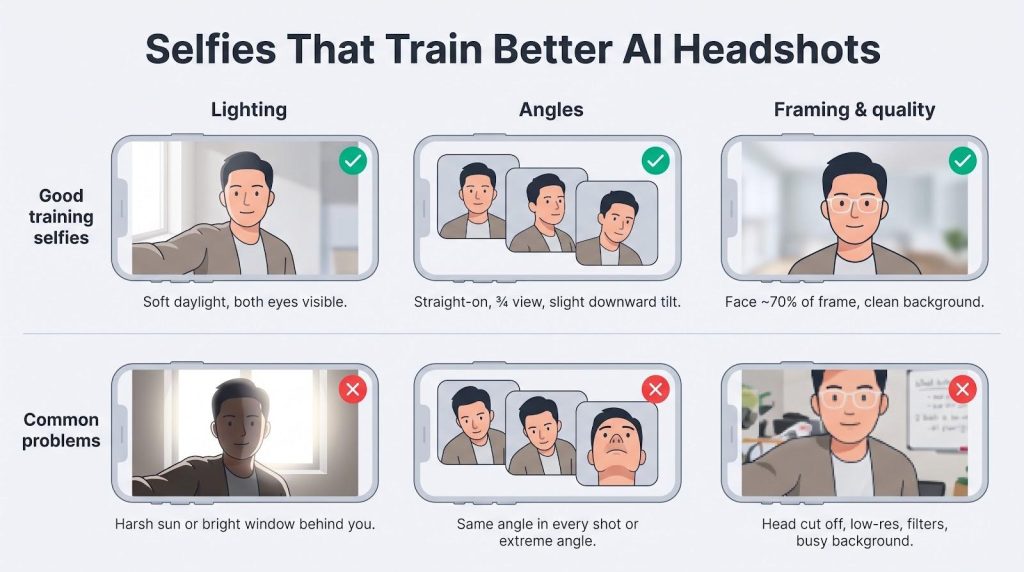
Lighting
- Shoot in soft daylight—next to a window or outdoors in open shade. Harsh noon sun creates deep shadows the model cannot fix.
Angles
- Provide at least three views: straight-on, gentle three-quarter, and a slight downward tilt. Ten copies of the same pose teach the model nothing new.
Recency
- Update the pool whenever you change hair, beard, or glasses. The algorithm cannot guess you shaved last month.
Framing
- Fill roughly seventy percent of the frame with your face but leave headroom; cropping too tight forces the model to invent ears or hairlines. Aim for source files at least 1,280 px on the long edge.
Accessories
- If you wear glasses daily, include them in half your shots so the model learns to render lenses.
Quality checks
- Skip group photos, Snapchat filters, and low-resolution social downloads; compression noise turns into plastic skin.
- Give each file a quick privacy scan: no whiteboards, addresses, or family members in the background.
Target 12–20 photos total. More adds little value; fewer increases drift. Follow this checklist and you will hand the model everything it needs to create a headshot that still looks like today-you at 56 pixels.
How to choose the right tool in 30 seconds
Pressed for time? Match your need to the tool (prices captured July 31, 2026).
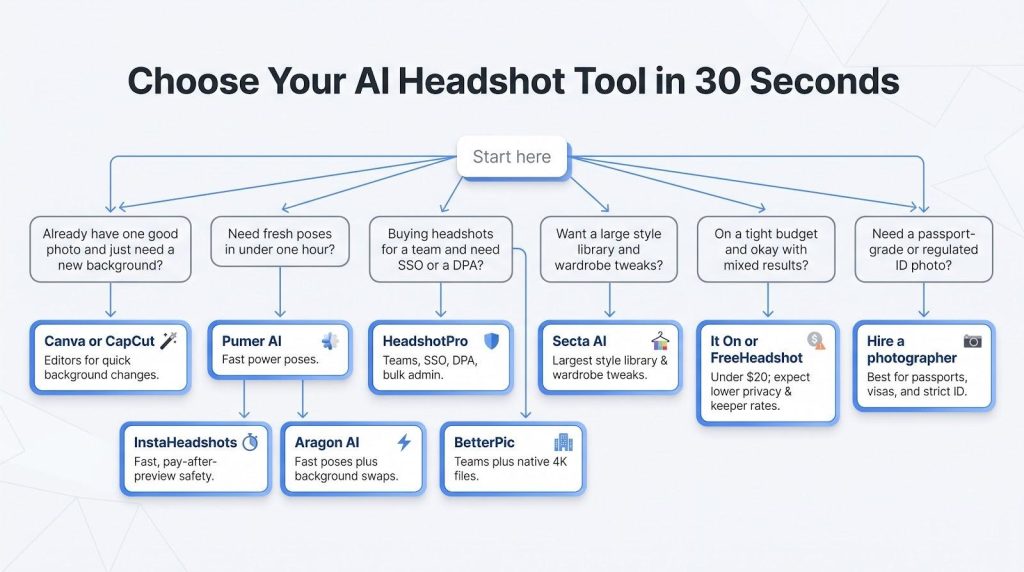
- One good photo and only a new background? Use Canva or CapCut and finish before your coffee cools.
- Fresh poses in under one hour? Choose InstaHeadshots for pay-after-preview safety, or Aragon for speed plus background swaps.
- Team rollout with SSO or a DPA? HeadshotPro handles paperwork and bulk admin; BetterPic is next if you also need 4 K files.
- Large style library and wardrobe tweaks? Secta’s Remix panel fits; plan extra minutes to curate 300 images.
- Tight budget and comfortable with mixed results? Try It On or FreeHeadshot at under $20, but expect lower privacy controls and keeper rates.
- None of the above and you need a passport-grade image? Book a photographer.
Frequently asked questions
What’s the best LinkedIn headshot generator right now?
InstaHeadshots for most solo users; HeadshotPro if you need team compliance paperwork (prices verified July 31, 2026).
Are AI headshots allowed on LinkedIn?
Yes. LinkedIn’s guidelines focus on authenticity and harassment, not the technology behind the photo, as long as it looks like you.
Can recruiters tell a headshot was generated?
Sometimes. A March 25, 2026 study of 1,664 people found detection accuracy shifts with age, device, and user confidence. Aim for subtle edits to blend in.
How much does an AI LinkedIn headshot cost?
$17–$60 per person among our finalists (captured July 31, 2026). True cost is $2–$6 per usable photo once you factor keeper rate.
How long does generation take?
14 minutes to 1 hour in our tests: InstaHeadshots was fastest; Secta the slowest. Allow up to 24 hours if you pay for human retouching.
Will my photos train somebody else’s AI model?
The top five tools state no. Only HeadshotPro and BetterPic publish SOC 2 reports. Always skim the privacy page for an explicit “no public-model training” line.
Can I get a refund if the images don’t look like me?
HeadshotPro offers an instant refund. InstaHeadshots and Aragon require a redo first. Secta provides no refund after any download. BetterPic asks you to try paid retouching before a refund.
Can I use an AI headshot in paid ads or print?
Usually. BetterPic and HeadshotPro grant full commercial rights up front. Budget tools may restrict ads, so read the license.
Should I disclose that my photo is AI-generated?
Not required, but a short note such as “AI-enhanced headshot” can build trust.
How often should I update my LinkedIn headshot?
Every two to three years or whenever your everyday look changes (glasses, hairstyle, noticeable aging).
How many keepers should I realistically expect from a 50-image plan?
Plan for five to fifteen that clear all three of our checks, and one or two you would genuinely post. That is why cost per keeper, not sticker price, decides these rankings: a $17 bundle yielding three usable frames costs more per photo than a $59 plan yielding twelve.
What is the single biggest cause of a disappointing batch?
The upload set, not the generator. Ten near-identical selfies from one afternoon give the model nothing to work with, and no amount of GPU time fixes that. Follow the selfie checklist above before blaming the tool, and if a batch still misses, use the free redo most of these vendors offer rather than paying twice.
Conclusion
If you take one number from this guide, make it cost per keeper. Sticker price tells you almost nothing: the cheapest bundle here can work out dearer per usable photo than the most expensive, and the hour you spend sorting mediocre files is a real cost too.
From there the choice is short. Solo professional who wants a new photo today with no downside risk: InstaHeadshots, because you see every frame before paying. Rolling out across a team where legal will ask for a DPA: HeadshotPro. Image headed for print or a conference banner: BetterPic. Want to keep tweaking backgrounds and attire after the batch lands: Aragon. Chasing the widest style library and happy to curate: Secta.
Whichever you pick, do the 56-pixel test before you call it done. Upload the file, search your own name on LinkedIn, and look at the thumbnail the way a prospect will. If that tiny circle does not read as you, no rubric in this article matters.